Admission Cycles
An admission cycle defines a specific intake period — for example, "2026 Grade 1 Intake". Each cycle has a defined capacity, application window, and target class level.
Creating an Admission Cycle
- Go to Admissions in the sidebar.
- Click Admission Cycles.
- Click New Cycle.

- Fill in the cycle details:
| Field | Description |
|---|---|
| Cycle Name | Descriptive name, e.g. "2026 Form 1 Intake" |
| Academic Year | The term this intake feeds into |
| Target Class | The class level applicants will join |
| Total Capacity | Maximum number of places available |
| Open Date | When applications open on the portal |
| Close Date | Application deadline |
| Status | Draft → Active → Closed |
- Click Save.
Activating a Cycle
A cycle must be Active for the public portal to accept applications. Change the status from Draft to Active when you are ready to open applications.
warning
Setting a cycle to Closed will immediately stop accepting new applications from the portal. Existing applications are not affected.
Monitoring a Cycle
From the cycles list, you can see:
- Total applications received
- Applications by status (pending, shortlisted, admitted, rejected)
- Remaining capacity
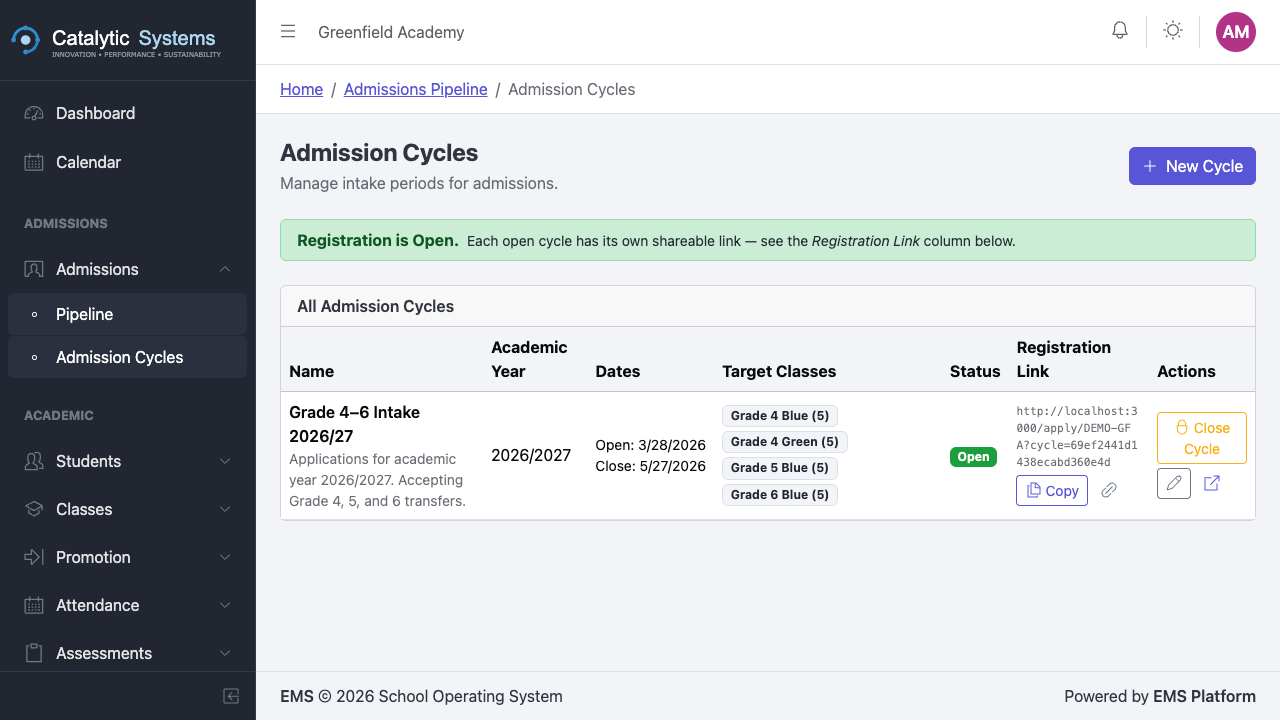

Click a cycle to open the Application Pipeline for that cycle.